
On this page:
The Housing Capacity Assessment Platform (HCAP) is a statewide modelling platform that has been developed to support housing target implementation and assist council’s with strategic planning for housing.
HCAP outputs will inform the extent to which municipalities create enough capacity to achieve their housing target specified in the Planning Policy Framework. Using HCAP ensures a consistent approach to measuring planning scheme capacity across municipalities.
What are housing targets?
Plan for Victoria includes local government housing targets that specify the share each council will contribute to achieving the state’s target for 2.24 million new homes by 2051.
The targets ensure that every planning scheme identifies enough realistic opportunities for new development to deliver the targeted number of homes.
Housing targets are crucial for housing affordability and choice. They ensure we can build enough homes to meet Victoria’s needs. Targets help:
- improve housing affordability by delivering different housing typologies, particularly in areas where you want to live
- improve strategic planning for infrastructure and services that stimulate local economies and provide greater planning certainty for business investment and more local jobs.
The targets represent the capacity required in each council’s planning scheme to deliver their share of new housing. Housing targets are a measure of planning scheme capacity – local councils will be assessed against the capacity for housing their planning facilitates, rather than physically built homes.
What is the Housing Capacity Assessment Platform (HCAP)?
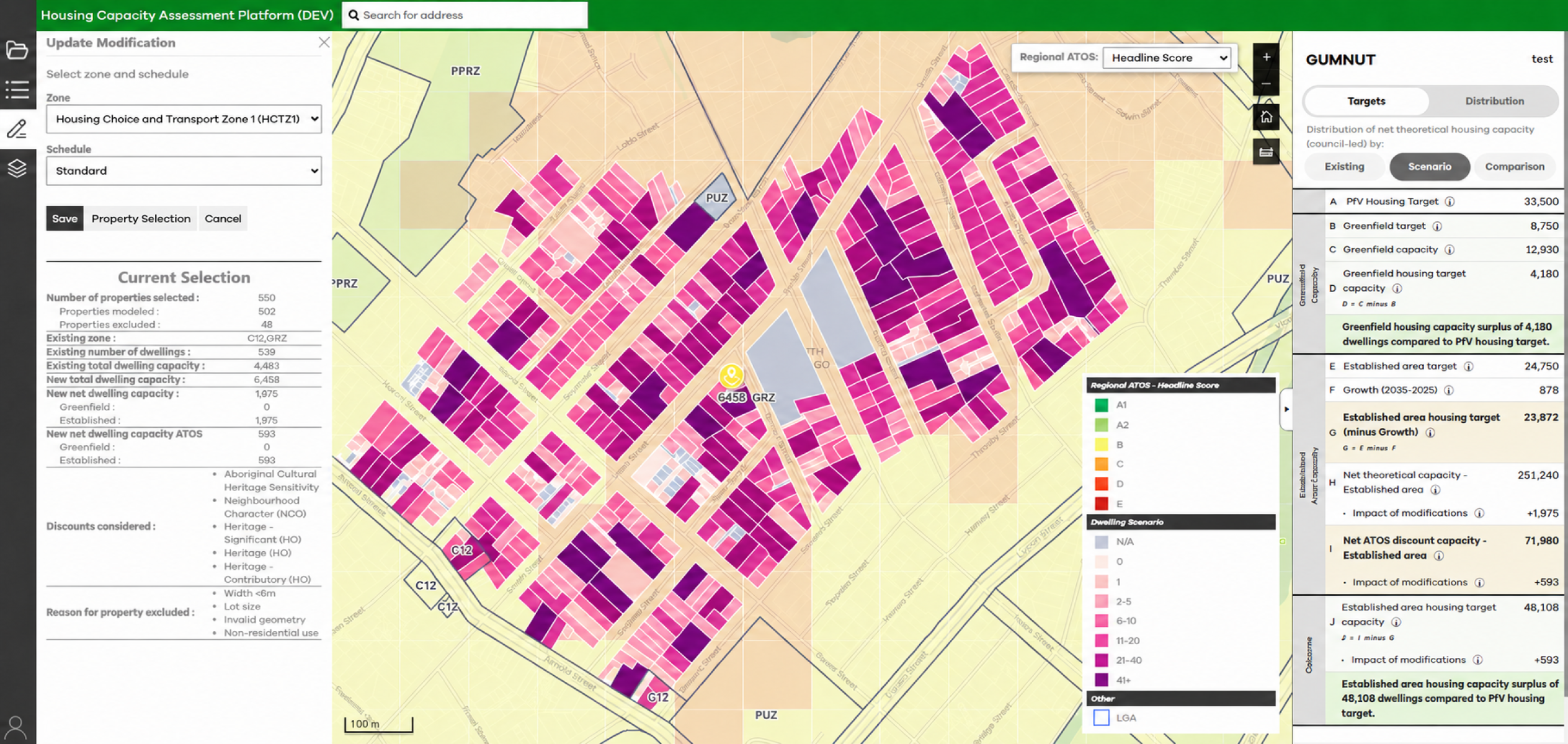
HCAP is a web-based platform developed by the Department of Transport and Planning (DTP) that estimates the total capacity for housing enabled by a local government area’s planning scheme. It calculates the theoretical number of dwellings that could be built under current and proposed zoning scenarios and allows councils to test how changes to zones or overlays would affect that capacity.
HCAP’s capacity results inform DTP’s assessment of whether local council planning schemes enable sufficient capacity to realise their respective housing target, as specified in Plan for Victoria and the Planning Policy Framework (PPF).
Using HCAP ensures a consistent approach to measuring planning scheme capacity across municipalities.
The goal is for every council to contribute to addressing housing need proportionate to their unique contextual situation.
What is Access to Opportunities and Services (ATOS)?
Plan for Victoria emphasises increasing housing supply in well located areas with good access to jobs and services, fostering the development of neighbourhoods where residents can meet most of their daily needs locally via walking, cycling, or public transport.
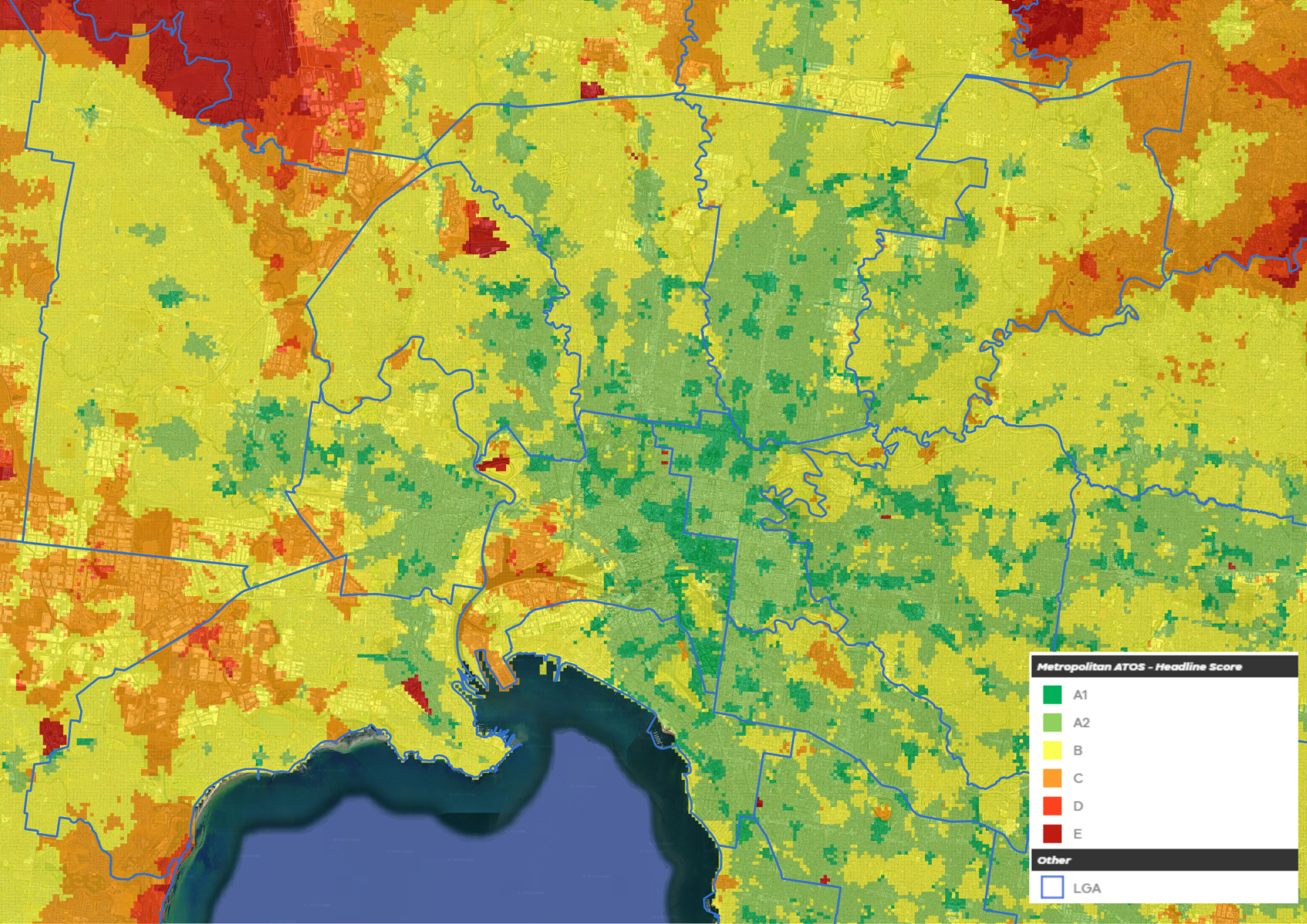
Access to Opportunities and Services (ATOS) is a new dataset, incorporated within HCAP. It provides information about public transport and the location of jobs and community facilities and services (such as supermarkets, medical services and open space). ATOS scores range from A1 (best) to E (lowest) and should be used to prioritise where housing change is to be prioritised.
ATOS is integrated within the assessment of local planning scheme housing capacity, with greater weight given to housing capacity in high scoring ATOS areas.
Planning authorities should use ATOS as a starting point to help identify the best locations to accommodate more housing.
Further information on the methodology which informs ATOS is outlined within the ATOS Guide (PDF, 1.1 MB).
How does HCAP calculate capacity for housing?
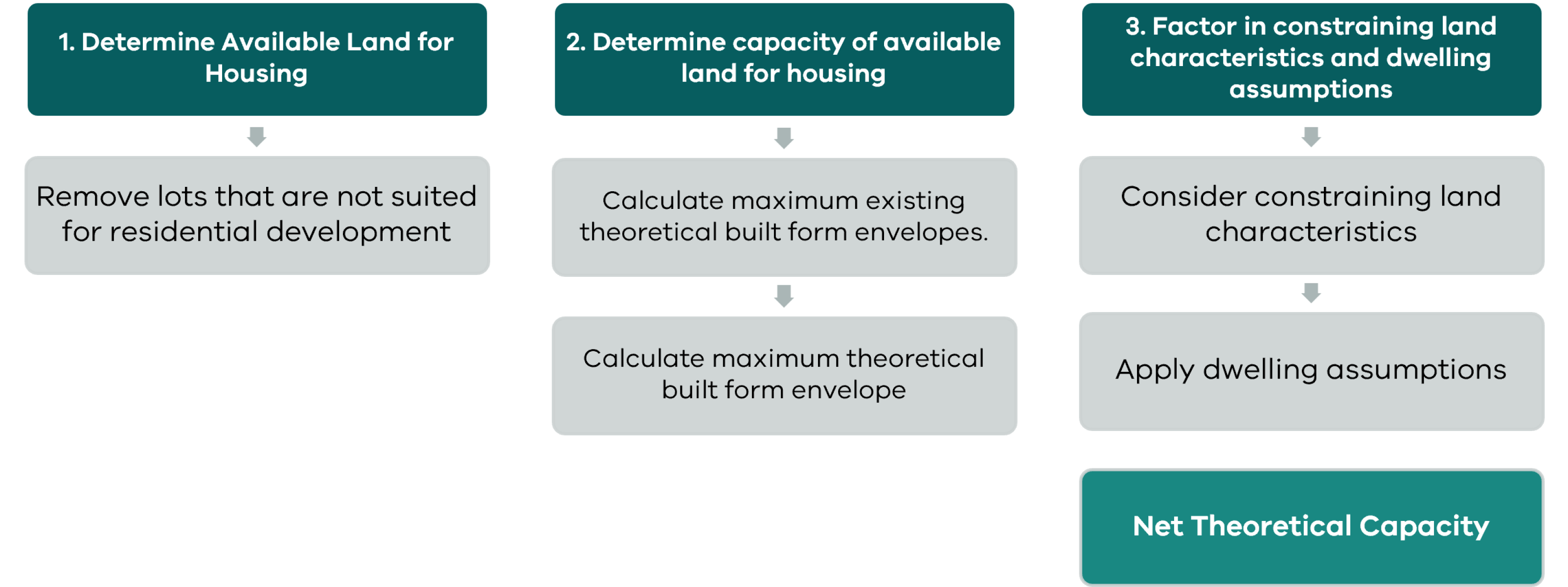
To assess a planning scheme’s ability to meet housing targets, HCAP first calculates the total theoretical capacity that is facilitated by an existing planning scheme (Process 1).
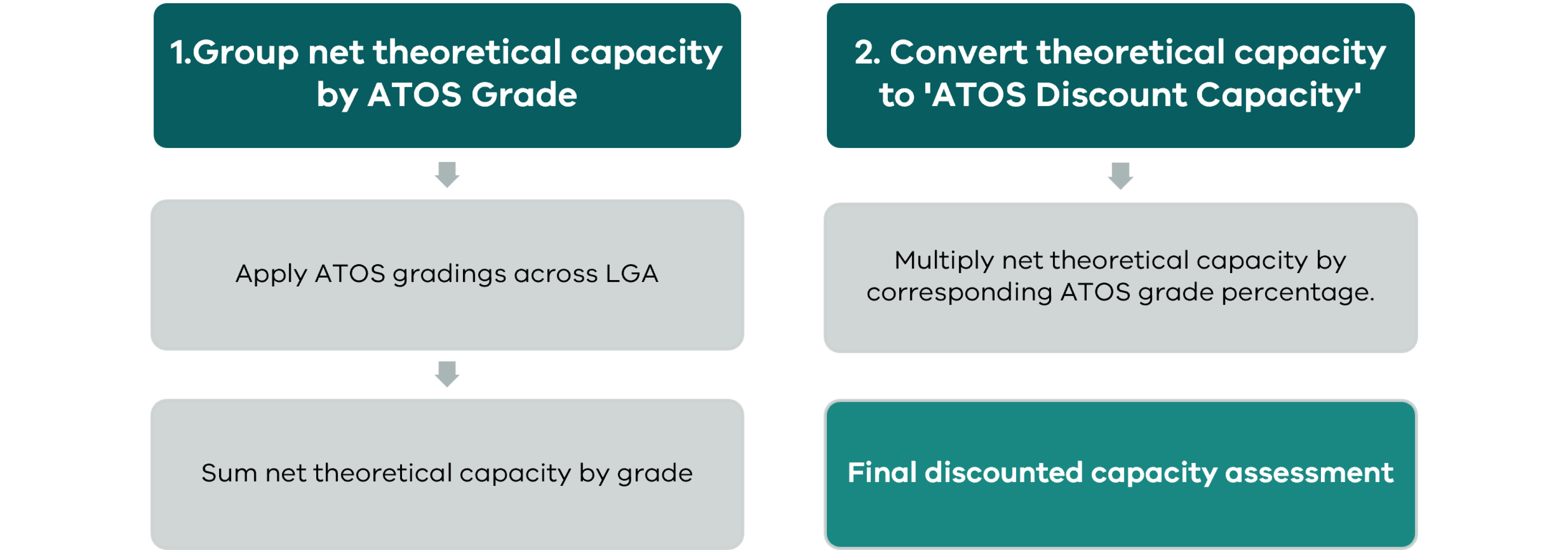
HCAP then assesses whether that theoretical capacity is in well-serviced locations across the municipality (Process 2).
These processes are described below, however further information on the methodology and assumptions for HCAP is outlined in the HCAP Companion Guide and Technical Notes (PDF, 2.0 MB) and Regional HCAP Companion Guide and Technical Notes (PDF, 2.8 MB).
How HCAP applies differently for regional councils?
HCAP distinguishes between metropolitan and regional areas, recognising that there are fundamental differences such as lot sizing, transport services, settlement hierarchies and access to opportunities and services.
The key differences employed across regional HCAP are:
- The measures and thresholds that contribute to local ATOS gradings have been tailored to reflect more appropriate levels of available public transport and services access across corresponding hierarchies as defined in Plan for Victoria i.e. Major Regional City, Regional City etc.
- Three additional ‘urban zones’ are considered within capacity modelling. These are based on guidance within PPN99: Implementing a Strategic Settlement Boundary (Low Density Residential Zone, Urban Growth Zone, Rural Living Zone).
- Density per hectare (DPH) assumptions are applied to lots greater than 5,000sqm, and are varied on the basis of zoning i.e. NRZ – 8dph
- Where Urban Development Program (UDP) program data is available, it replaces any modelled capacity on greenfield land.
- Due to a lack of consistent tree point data. Tree canopy coverage is not considered as a constraint within HCAP results.
- Additional assumptions are made to categorise housing capacity as either ‘established’ or ‘greenfield’ within defined urban settlement areas.
The Regional HCAP Companion Guide and Technical Notes (PDF, 2.8 MB) further explains how HCAP differs in regional Victoria.
Who should use HCAP?
HCAP is designed for use by the Department of Transport and Planning (DTP) and local government planners.
HCAP is available for use online to Councils who have completed a relevant user agreement with DTP.
For Councils who do not yet have access, please contact planforvictoria@transport.vic.gov.au
Further information
Further information on ATOS can be found in the ATOS Guide (PDF, 1.1 MB).
The HCAP Companion Guide and Technical Notes (PDF, 2.0 MB)and Regional HCAP Companion Guide and Technical Notes (PDF, 2.8 MB)further explains how to use the HCAP tool.
You can also learn more by watching our HCAP Guidance Video, which provides information on the following:
- Getting Started with HCAP
- Selecting a zone for a modification
- Selecting a strategic area for a modification
- Manually select a property or group of properties for a modification
- Upload a shapefile to select properties for a modification
- Update an existing modification
- Suggest a new dwelling capacity for a property
- View property details and proposed changes whilst in a modification
- Understanding the target and distribution data shown in the summary panel
- Understanding information in a modification – Discounts considered and reason for property excluded in a modification
- Know how to view the ATOS layer and change the ATOS attributes.
When you open the YouTube video, there are chapter markers embedded into the video for ease of navigation.
For any additional information or questions, please contact planforvictoria@transport.vic.gov.au
Page last updated: 26/10/26